Redundancy Protocols Lab
LAB for studiy the diffrence between redundncy protocols
1. Overview of Redundancy Protocols
What meant by redundancy network
Redundancy in networking refers to the practice of incorporating backup or duplicate components, such as links, devices, or paths, to ensure continuous network operation in the event of a failure. The primary goal of redundancy is to minimize downtime, maintain high availability, and ensure reliability. Redundant networks are critical for businesses and services that require uninterrupted connectivity, such as data centers, financial institutions, and healthcare systems.
Top Redundancy Protocols
1. HSRP (Hot Standby Router Protocol)
Developed by: Cisco (proprietary protocol).
Purpose: Provides gateway redundancy by creating a virtual router (with a virtual IP and MAC address) shared between two or more physical routers.
How it works:
One router is elected as the active router (handles all traffic for the virtual IP).
The other routers are in standby mode (ready to take over if the active router fails).
Routers exchange hello messages to monitor each other’s status.
Key features:
Preemption: Allows a higher-priority router to take over as active.
Tracking: Monitors interfaces or routes and adjusts priorities dynamically.
Limitations:
Only one active router at a time (no load balancing).
Cisco proprietary, so it works only with Cisco devices.
2. GLBP (Gateway Load Balancing Protocol)
Developed by: Cisco (proprietary protocol).
Purpose: Provides both redundancy and load balancing across multiple routers.
How it works:
Multiple routers form a GLBP group and share a virtual IP address.
Each router in the group is assigned a unique virtual MAC address.
Hosts on the LAN are distributed across the routers using these virtual MACs, enabling load balancing.
If one router fails, the others continue to handle traffic.
Key features:
Load balancing: Traffic is distributed across multiple routers.
Redundancy: Backup routers take over if the primary fails.
Supports up to 4 active routers in a group.
Limitations:
- Cisco proprietary, so limited to Cisco devices.
3. VRRP (Virtual Router Redundancy Protocol)
Developed by: IETF (open standard, defined in RFC 3768).
Purpose: Provides gateway redundancy similar to HSRP but is vendor-neutral.
How it works:
Multiple routers form a VRRP group and share a virtual IP address.
One router is elected as the master router (handles traffic for the virtual IP).
The other routers are in backup mode (ready to take over if the master fails).
Routers exchange advertisements to monitor each other’s status.
Key features:
Preemption: Allows a higher-priority router to become the master.
Open standard: Works across different vendors’ devices.
Limitations:
No native load balancing (only redundancy).
Less efficient load distribution compared to GLBP.
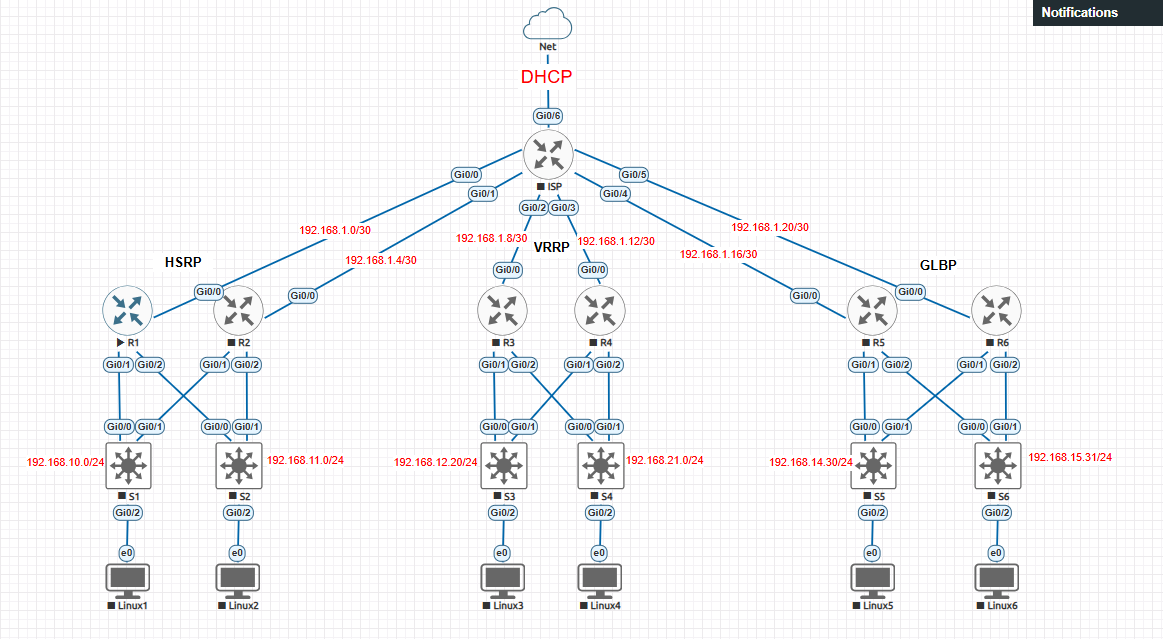
2. Topology
![[Pasted image 20250307201636.png]]
 the mesh topology is used cause it suited the redundancy configuration
2.1 IP Table
| Rudndncy Protocol | Device | Interface | IP | Mask | Gateway |
|---|---|---|---|---|---|
| / | ISP | Gi0/0 | 192.168.1.1 | 255.255.255.252 | / |
| / | ISP | Gi0/1 | 192.168.1.5 | 255.255.255.252 | / |
| / | ISP | Gi0/2 | 192.168.1.9 | 255.255.255.252 | / |
| / | ISP | Gi0/3 | 192.168.1.13 | 255.255.255.252 | / |
| / | ISP | Gi0/4 | 192.168.1.17 | 255.255.255.252 | / |
| / | ISP | Gi0/5 | 192.168.1.21 | 255.255.255.252 | / |
| / | ISP | Gi0/6 | DHCP | 255.255.255.252 | / |
| HSRP | R1 | Gi0/0 | 192.168.1.2 | 255.255.255.252 | / |
| HSRP | R1 | Gi0/1 | 192.168.10.1 | 255.255.255.0 | / |
| HSRP | R1 | Gi0/2 | 192.168.11.1 | 255.255.255.0 | / |
| HSRP | R2 | Gi0/0 | 192.168.1.6 | 255.255.255.252 | / |
| HSRP | R2 | Gi0/1 | 192.168.10.2 | 255.255.255.0 | / |
| HSRP | R2 | Gi0/2 | 192.168.11.2 | 255.255.255.0 | / |
| HSRP | Linux1 | e0 | 192.168.10.10 | 255.255.255.0 | 192.168.20.254 |
| HSRP | Linux2 | e0 | 192.168.11.10 | 255.255.255.0 | 192.168.21.254 |
| VRRP | R3 | Gi0/0 | 192.168.1.10 | 255.255.255.252 | / |
| VRRP | R3 | Gi0/1 | 192.168.20.1 | 255.255.255.0 | / |
| VRRP | R3 | Gi0/2 | 192.168.21.1 | 255.255.255.0 | / |
| VRRP | R4 | Gi0/0 | 192.168.1.14 | 255.255.255.252 | / |
| VRRP | R4 | Gi0/1 | 192.168.20.2 | 255.255.255.0 | / |
| VRRP | R4 | Gi0/2 | 192.168.21.2 | 255.255.255.0 | / |
| VRRP | Linux3 | e0 | 192.168.20.10 | 255.255.255.0 | 192.168.20.254 |
| VRRP | Linux4 | e0 | 192.168.21.10 | 255.255.255.0 | 192.168.21.254 |
| GLBP | R5 | Gi0/0 | 192.168.1.18 | 255.255.255.252 | / |
| GLBP | R5 | Gi0/1 | 192.168.30.1 | 255.255.255.0 | / |
| GLBP | R5 | Gi0/2 | 192.168.31.1 | 255.255.255.0 | / |
| GLBP | R6 | Gi0/0 | 192.168.1.22 | 255.255.255.252 | / |
| GLBP | R6 | Gi0/1 | 192.168.30.2 | 255.255.255.0 | / |
| GLBP | R6 | Gi0/2 | 192.168.31.2 | 255.255.255.0 | / |
| GLBP | Linux5 | e0 | 192.168.30.10 | 255.255.255.0 | 192.168.30.254 |
| GLBP | Linux6 | e0 | 192.168.31.10 | 255.255.255.0 | 192.168.31.254 |
2.2 images
| Device | Image name |
|---|---|
| Router | vios-adventerprisek9-m.spa.159-3.m6 |
| Switch | vios_l2-adventerprisek9-m.ssa.high_iron_20200929 |
| PC | TinyCore Linux |
3 Device Configuration
3.1 ISP Router Configuration
1
2
3
4
5
6
7
8
9
10
11
12
13
14
15
16
17
18
19
20
21
22
23
24
25
26
27
28
29
30
31
32
33
34
35
36
37
38
39
40
41
42
43
44
45
46
47
48
49
50
51
52
53
54
55
56
57
58
59
en

config t

int gi0/0

ip address 192.168.1.1 255.255.255.252

no sh

int gi0/1

ip address 192.168.1.5 255.255.255.252

no sh

int gi0/2

ip add 192.168.1.9 255.255.255.252

no sh

int gi0/3

ip add 19.168.1.13 255.255.255.252

no sh

int gi0/4

ip add 192.168.1.17 255.255.255.252

no sh

int gi0/5

ip add 192.168.1.21 255.255.255.252

no sh

exit

router ospf 1

network 192.168.1.0 0.0.0.3 area 0

network 192.168.1.4 0.0.0.3 area 0

network 192.168.1.8 0.0.0.3 area 0

network 192.168.1.12 0.0.0.3 area 0

network 192.168.1.16 0.0.0.3 area 0

network 192.168.1.20 0.0.0.3 area 0

end

wr
3.2 HSRP Configuration
R1
1
2
3
4
5
6
7
8
9
10
11
12
13
14
15
16
17
18
19
20
21
22
23
24
25
26
27
28
29
30
31
32
33
34
35
36
37
38
39
40
41
42
43
44
45
46
47
en

config t

int gi0/0

ip address 192.168.1.2 255.255.255.252

no sh

int gi0/1

ip address 192.168.10.1 255.255.255.0

standby 1 ip 192.168.10.254

standby 1 priority 110

standby 1 preempt

no sh

int gi0/2

ip address 192.168.11.1 255.255.255.0

standby 2 ip 192.168.11.254

standby 2 priority 110

standby 2 preempt

no sh

exit

router ospf 1

network 192.168.10.0 0.0.0.255 area 0

network 192.168.11.0 0.0.0.255 area 0

network 192.168.1.0 0.0.0.3 area 0

end

wr
R2
1
2
3
4
5
6
7
8
9
10
11
12
13
14
15
16
17
18
19
20
21
22
23
24
25
26
27
28
29
30
31
32
33
34
35
36
37
38
39
40
41
42
43
44
45
46
47
en

config t

int gi0/0

ip address 192.168.1.6 255.255.255.252

no sh

int gi0/1

ip address 192.168.10.2 255.255.255.0

standby 1 ip 192.168.10.254

standby 1 priority 90

standby 1 preempt

no sh

int gi0/2

ip address 192.168.11.2 255.255.255.0

standby 2 ip 192.168.11.254

standby 2 priority 90

standby 2 preempt

no sh

exit

router ospf 1

network 192.168.10.0 0.0.0.255 area 0

network 192.168.11.0 0.0.0.255 area 0

network 192.168.1.4 0.0.0.3 area 0

end

wr
3.3 VRRP Configuration
R3
1
2
3
4
5
6
7
8
9
10
11
12
13
14
15
16
17
18
19
20
21
22
23
24
25
26
27
28
29
30
31
32
33
34
35
36
37
38
39
40
41
42
43
44
45
46
47
en

config t

int gi0/0

ip address 192.168.1.10 255.255.255.252

no sh

int gi0/1

ip address 192.168.20.1 255.255.255.0

vrrp 1 ip 192.168.20.254

vrrp 1 priority 110

vrrp 1 preempt

no sh

int gi0/2

ip address 192.168.21.1 255.255.255.0

vrrp 2 ip 192.168.21.254

vrrp 2 priority 110

vrrp 2 preempt

no sh

exit

router ospf 1

network 192.168.20.0 0.0.0.255 area 0

network 192.168.21.0 0.0.0.255 area 0

network 192.168.1.8 0.0.0.3 area 0

end

wr
R4
1
2
3
4
5
6
7
8
9
10
11
12
13
14
15
16
17
18
19
20
21
22
23
24
25
26
27
28
29
30
31
32
33
34
35
36
37
38
39
40
41
42
43
44
45
46
47
en

config t

int gi0/0

ip address 192.168.1.14 255.255.255.252

no sh

int gi0/1

ip address 192.168.20.2 255.255.255.0

vrrp 1 ip 192.168.20.254

vrrp 1 priority 90

vrrp 1 preempt

no sh

int gi0/2

ip address 192.168.21.2 255.255.255.0

vrrp 2 ip 192.168.21.254

vrrp 2 priority 90

vrrp 2 preempt

no sh

exit

router ospf 1

network 192.168.20.0 0.0.0.255 area 0

network 192.168.21.0 0.0.0.255 area 0

network 192.168.1.12 0.0.0.3 area 0

end

wr
3.4 GLBP Configuration
R5
1
2
3
4
5
6
7
8
9
10
11
12
13
14
15
16
17
18
19
20
21
22
23
24
25
26
27
28
29
30
31
32
33
34
35
36
37
38
39
40
41
42
43
44
45
46
47
48
49
50
51
en

config t

int gi0/0

ip address 192.168.1.18 255.255.255.252

no sh

int gi0/1

ip address 192.168.30.1 255.255.255.0

glbp 1 ip 192.168.30.254

glbp 1 priority 110

glbp 1 preempt

glbp 1 load-balancing round-robin

no sh

int gi0/2

ip address 192.168.31.1 255.255.255.0

glbp 2 ip 192.168.31.254

glbp 2 priority 110

glbp 2 preempt

glbp 2 load-balancing round-robin

no sh

exit

router ospf 1

network 192.168.30.0 0.0.0.255 area 0

network 192.168.31.0 0.0.0.255 area 0

network 192.168.1.16 0.0.0.3 area 0

end

wr
R6
1
2
3
4
5
6
7
8
9
10
11
12
13
14
15
16
17
18
19
20
21
22
23
24
25
26
27
28
29
30
31
32
33
34
35
36
37
38
39
40
41
42
43
44
45
46
47
48
49
50
51
en

config t

int gi0/0

ip address 192.168.1.22 255.255.255.252

no sh

int gi0/1

ip address 192.168.30.2 255.255.255.0

glbp 1 ip 192.168.30.254

glbp 1 priority 90

glbp 1 preempt

glbp 1 load-balancing round-robin

no sh

int gi0/2

ip address 192.168.31.2 255.255.255.0

glbp 2 ip 192.168.31.254

glbp 2 priority 90

glbp 2 preempt

glbp 2 load-balancing round-robin

no sh

exit

router ospf 1

network 192.168.30.0 0.0.0.255 area 0

network 192.168.31.0 0.0.0.255 area 0

network 192.168.1.20 0.0.0.3 area 0

end

wr
3.5 Switches Configuration
1
2
3
4
5
6
7
8
9
enable
configure terminal
spanning-tree mode rapid-pvst
interface range gi0/1 - 24
spanning-tree portfast
exit
spanning-tree uplinkfast
end
write memory